How-To Article

Wrote a blog post that would be a value-add for tech-savvy readers for Proton, a SaaS company that provides privacy-focused online services. Used technical knowledge plus additional research to write “How to set up a private email server” and mock-up graphics for the piece.
Proton sample
How to set up a private email server
Setting up your own private email server puts your email infrastructure under your control.
This can be great for privacy since it cuts out big email service providers like Gmail and Microsoft Outlook, which can access and misuse your data. On the other hand, if you don’t set up and maintain your email server correctly, you put yourself at serious risk of security or deliverability issues.
There is a third option beyond using Big Tech companies or creating your own email server: Use a privacy-focused email provider. Proton Mail preserves your privacy with end-to-end encryption, while also applying the latest technology to keep your email reliable, fast, and safe from attacks.
We’ll cover some of the alternatives to hosting your own email server toward the bottom of this article. But if you do decide you want to take the DIY path, this article explains how to set up your personal email server step by step.
What is a private email server?
Advantages and disadvantages
How to set up a personal email server
Alternatives to setting up a personal email server
How Proton Mail gives you better privacy and reliability
Appendix: Email systems comparison
What is a private email server?
A private email server is a system of computer hardware and software for sending, receiving, and storing emails operated by an individual. The “private” in “private email server,” simply refers to the fact that you own it. You can buy email server hardware and software at any number of tech stores. In a later section, we’ll cover the option of renting server space.
If it’s just for your personal use, your email server only needs a small amount of RAM and 20 GB of storage. This means you could even use a dedicated laptop if you don’t want to pay for more advanced hardware.
Advantages of setting up a private email server
There are advantages to setting up your own private email server.
- The major advantage is that you bypass the big email service providers like Gmail and Microsoft Outlook. That means you protect your email data from being mined for ad targeting, training AI, or any other uses Big Tech companies decide they want to try down the road. You also cut out the risk that they will give your email data to government agencies or any other third parties.
- There are other advantages apart from protecting your data from Big Tech. By setting up your own private email server, you can tightly control and limit the network the server is connected to, decreasing your attack surface.
- You can also encrypt the entire device in case someone physically seizes it.
Disadvantages of setting up a private email server
There are significant disadvantages to setting up your own private email server.
- First, it requires a certain level of technical knowledge. If you don’t already know how to configure servers and secure them, you’ll need to invest a significant amount of time to learn from trusted sources. There are many how-to sites on the internet that do not have your best interests at heart or simply get things wrong.
- Second, setting up your own secure mail server takes dedication and ongoing work. You need to stay up to date on the latest threats, security advisories, and any available patches. You need to monitor your server for hardware and software problems that could result in data loss or less than 100% uptime.
- Third, if your server malfunctions or needs to be repaired, you will temporarily, or maybe even permanently lose access to your emails. While relying on only one server may reduce the target area for attacks, it does increase the likelihood and impact of infrastructure failure. Even if you have a backup server, you can run into major trouble.
- Fourth, email deliverability will depend on the uptime of your ISP and network connection to them. Lose internet connectivity for a week due to a bad storm? You will almost certainly lose some emails forever in this situation. Many ISPs also block outgoing traffic on port 25 for residential customers as a spam-prevention measure. This port is used to send outgoing email via SMTP, and without it you will not be able to host a residential email server at all.
- Fifth, you will have to allow the entire internet to connect to your mail server on port 25 (the default SMTP port) if you want to receive email from everyone. This opens up a host of security risks to your server but also to your home network in general. Enabling mobile email access from your phone will require opening yet more ports to the outside world. If you are not very familiar with firewalls this can severely compromise your home network’s security and that of any attached devices.
- Sixth, both IP and domain reputation matter for email deliverability. And IP reputation in particular is difficult to build with low e-mail volume and for known residential IP ranges. Much of your outgoing email may go to spam, at least initially, or be rejected outright.
- And finally, having a private email server in your own home may not be the safest physical location for it. While you may have more control over it physically, storing it in a residence introduces new risks, including theft, fire, flooding, curious pets, and rowdy kids.
How to set up a personal email server
Below are the broad steps for how to host your own email server. You should make a detailed plan for each step before you start the project.
Buy hardware
As we mentioned in an earlier section, you can get by with just a low-spec computer with a small amount of RAM and at least 10 or 20 GB of available storage. However, if you’re setting up an email server for a whole organization, you will probably need hardware with greater capacity. Consider purchasing a rack or tower server.
Keep in mind that your hardware will need to be compatible with your operating system, which will need to be compatible with the email server software you plan to use.
Get a static IP address with unblocked SMTP ports
You cannot use a regular residential IP address for your email server. These are typically blacklisted from other email servers to create a kind of firewall from infected home computers spewing viruses.
Contact your internet service provider to purchase a plan that comes with a static, public IP address that is not blacklisted. Make sure the IP address comes with unblocked SMTP ports, since those are the ports you need to run an email server.
Purchase and set up a domain
Go to a site that sells domains and pick out one you like. Your custom email domain is what appears at the end of your email address (unless you use a proxy) so choose carefully. Your email address will look something like hello@exampledomain.com.
Once you have purchased the domain, you will be required to register it. If you do not want your personal data to be available on the public register database, you can use a WHOis service. Most sites that sell domains offer this service. They will put their information in the public registrar as a proxy for yours.
Next, you need to activate a DNS service. Most sites that sell domains also offer DNS service, but you might want to set this up through a separate provider to prevent a single hack bringing down both your domain and DNS. Once you have a DNS provider, fill in the DNS fields for your domain: A, MX, TXT, and PTR records. Be sure to add SPF, DKIM, and DMARC records in a TXT record field to prevent email spoofing.
Obtain a TLS certificate
The TLS certificate is what allows you to encrypt your emails as they are transferred over the internet. Of course, this does not mean they are encrypted while they are on servers (and they will visit a lot of servers on the way across the internet to their intended recipient).
This certificate cannot be self-signed. If it is, other email servers will reject emails coming from yours. You must get a valid TLS certificate from a Certificate Authority such as Let’s Encrypt and ensure that it remains valid over time.
Choose email server software
Now that you have the network basics set up, it is time to pick the email server software you want to use.
There are three general roles of email server software: Mail User Agent (MUA), Mail Delivery Agent (MDA), and Mail Transfer Agent (MTA). Some software packages handle all three roles, some software packages cover parts of different roles, and some software packages only provide a few of the services included in one role. It is up to you to mix and match your email server software, depending on what fits your needs best.
Mail User Agent (MUA)
A Mail User Agent is the software that provides the user interface for emails. It is also called an email client or an email reader. Examples include Thunderbird, Airmail, and Outlook. The mail user agent can be a device-based application and/or a web-based application.
Depending on the software you choose, you will need to configure it based on your needs. Pay special attention to privacy and security configurations.
Mail Delivery Agent (MDA)
A Mail Delivery Agent, or the message delivery agent, is what delivers the email message into a local inbox. Typically you can configure it to use the POP protocol or the IMAP protocol for fetching emails. IMAP is usually preferred because it allows managing and organizing a single mailbox from multiple devices.
If your private email server has very limited storage, you may want to opt for POP since it takes up less space (the emails are stored on the MUA on the user’s device rather than on the server).
Examples of software that cover the Mail Delivery Agent role include Dovecot, Qpopper, Courier, and Cyrus IMAP.
Mail Transfer Agent (MTA)
A Mail Transfer Agent, also called “mail relay”, sends emails out using SMTP (Simple Mail Transfer Protocol). When you are configuring your SMTP parameters, consider limiting your banner so you are not broadcasting details about your system or identification.
As you set up your MTA, make sure DKIM, SPF, and DMARC records are configured correctly in DNS and that for DKIM the corresponding keys are installed correctly in your MTAupdated. You may have to go back to your DNS settings to manually update the TXT fields with the data created by your software’s DKIM, SPF, and DMARC functions. This is critical to making sure your outgoing emails are not rejected as spam by recipient programs.
Examples of software that cover the Mail Transfer Agent role include Postfix and Exim.
Install spam filter and virus protection
If none of your email server software comes with a spam filter or virus protection, you need to add those to your email server.
Examples of spam filters are programs like SpamAssassin or Rspamd.
For an example of a virus protection program, you can check out ClamAV.
Alternatives to setting up a private email server
If the above sounds too involved for you, there are some alternatives to setting up a personal email server that require far less technical expertise and investment.
Renting from a hosting provider
You can rent a private email server from a hosting provider. This does not mean you rent the hardware to bring home. You rent the use of a server, often located in a warehouse full of stacks of servers. If you can (although often you are not given this level of transparency), make sure to pick a hosting provider that has strong physical security at its warehouse and is in a country with good privacy laws.
The benefit of renting an email server is that it can eliminate some of the work on your end. For example, it is likely that the server provider already has a business-level IP address and unblocked ports ready to go for your email server.
If you’re renting from a full-service hosting provider, they can do all the setup and maintenance for you, across the board.
One downside to all this, of course, is that you lose some control. For example, if a problem comes up with your email server’s IP address, you will not be able to address it with the internet service provider; only the server provider who owns the ISP account will be able to do that.
The biggest downside, though, is that most hosting providers do not provide end-to-end encryption of your emails. Like a landlord, the hosting provider gives you a lock, but they keep a copy of the key. This presents a similar disadvantage as using Big Tech email service providers.
Using a secure email provider
If you want to leave all the technical implementation to experts while also having your email data encrypted on servers at all times, the best alternative is an end-to-end encrypted email provider.
With end-to-end encryption, your emails are secured using your recipient’s public key on your device itself, before anything is even uploaded to an email server. This means no one else (other than your recipient) has access to your data at any point, including your email provider. Even if there were a data breach or the government legally forces the provider to turn over data, all they will see is cryptotext that they cannot decipher.
How Proton Mail gives you better privacy and reliability
Proton Mail is the largest encrypted email provider in the world. When we launched Proton Mail in 2014, we set out to solve many of the problems email self hosting attempts to address: data ownership, privacy, and freedom from Big Tech surveillance.
Specifically, Proton Mail offers a unique combination of benefits you can’t get by self hosting or using any other email provider:
- End-to-end encryption — As discussed above, Proton Mail encrypts your data on your device before sending it to our servers, so we can’t see your messages or attachments.
- Zero-access encryption — When someone emails you from a non-private email server, such as Gmail, we encrypt the message immediately using your public key, so only you can decrypt it. Learn more about zero-access encryption.
- Swiss privacy — Proton is based in Switzerland, so your data is protected by some of the world’s strongest privacy laws. We are not subject to US or EU legal jurisdiction.
- Reliability — Our service level agreement guarantees 99.95% uptime, which is among the best available. Additionally, we create multiple backups of your files in geographically separated data centers, so even if there were a natural disaster, you will not lose any data.
- Advanced security — Proton Mail uses many layers of security to protect your inbox, starting with your account security all the way to the physical security of the servers we own and operate. Your Proton Account comes with multiple tools to defend against hackers, and we’ve implemented state-of-the-art encryption techniques, such as elliptic curve cryptography. Learn more about Proton Mail security.
- Transparency — Unlike many Big Tech email providers, all our code is open source and independently audited by security experts. As scientists, we believe in transparency and peer review.
Finally, Proton is community-supported. We make money from subscriptions, not advertising, so our only obligation is to protect your data and provide you with high-quality service. As over 100 million people have created Proton Accounts, we have expanded our services to include calendar, cloud storage, VPN, and password manager — all part of our mission to create an internet where privacy is the default.
It’s free to sign up and start using all these services, and it only takes a few seconds. Create an account to get started.
Appendix: Email systems comparison
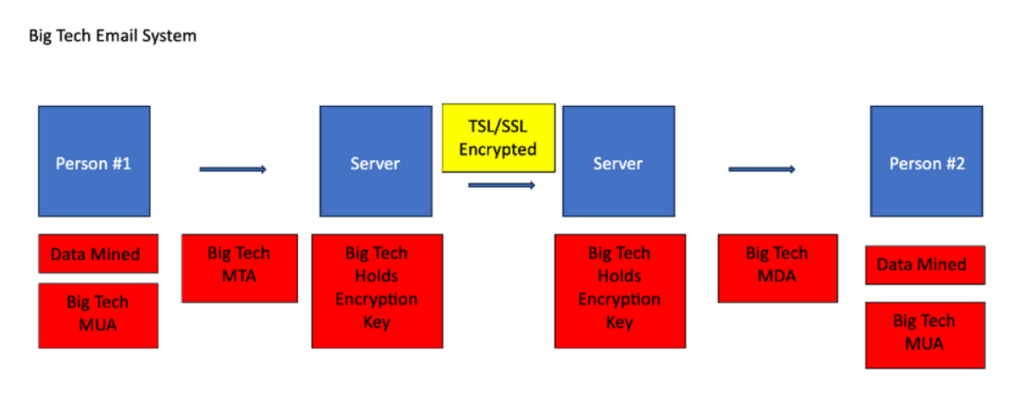
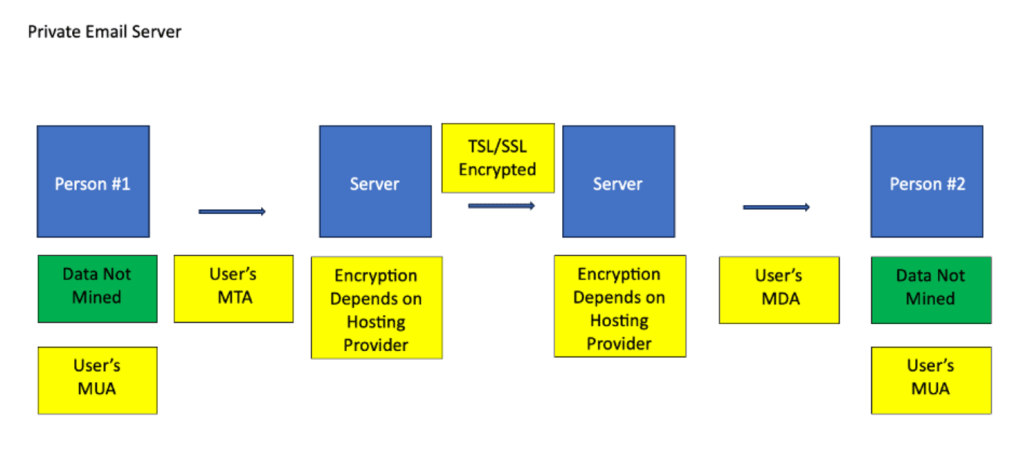
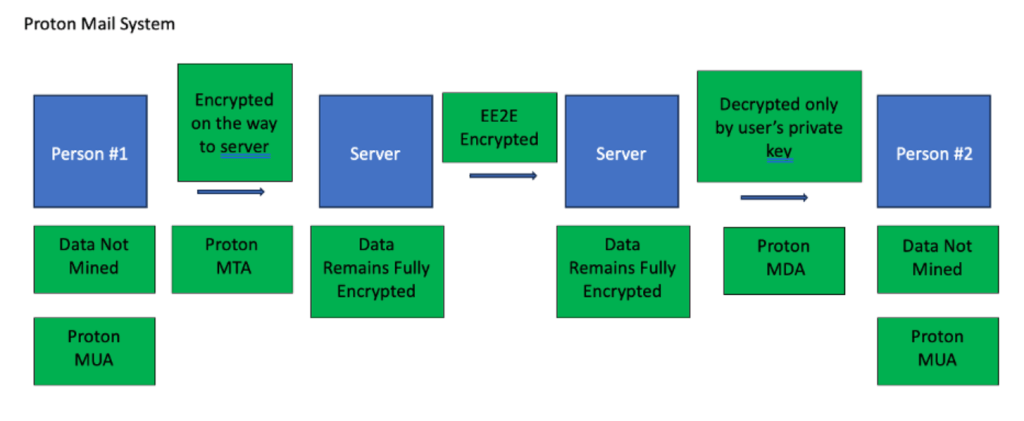
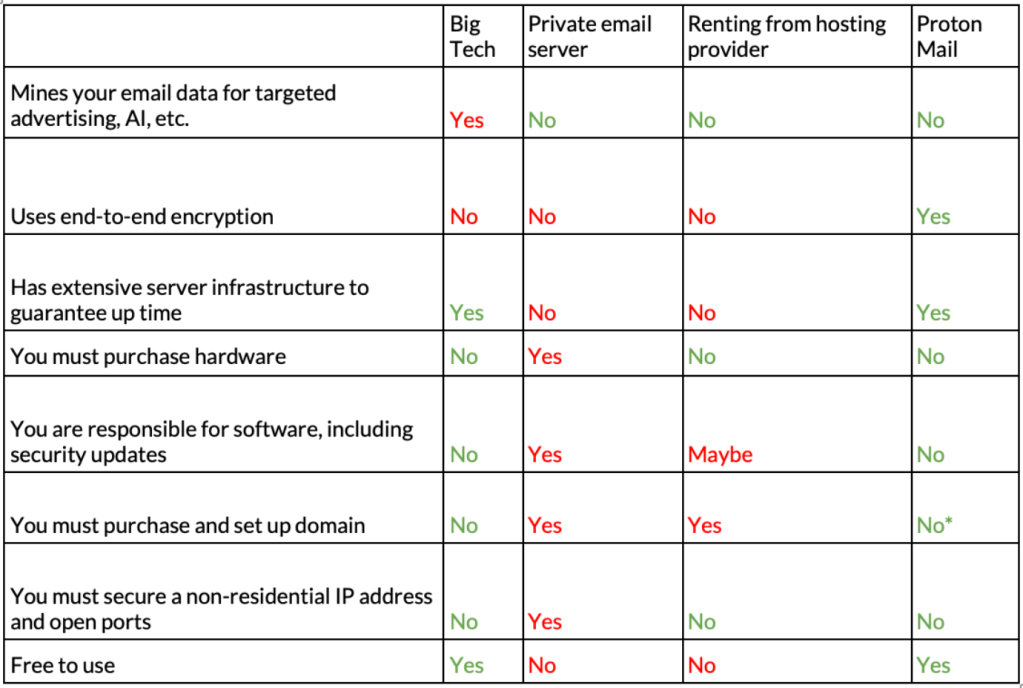
Below are three diagrams illustrating the way data is handled in different email systems. The first shows how Big Tech companies easily access your data. The second shows Proton Mail’s implementation, which encrypts email messages locally before sending them to the server. And the third depicts a typical private email server setup, which preserves privacy at the expense of security because emails are not end-to-end encrypted by default.
Podcast Show Notes

Wrote the podcast notes for all 10 shows, summarizing highly technical content in a way that’s funny and compelling to engineers (low bar?). Topics include enterprise networking, cybersecurity, platform engineering, IoT, IPv6, and more. Packet Pushers ranks in the top 1% of most listened to podcast networks in the world.
Packet Pushers samples

We turn the nerd meter up to eleven on today’s episode with a longtime friend of the show, Russ White. First, we dive into how an Ethernet adapter knows when a link is lost, where Russ teaches us all about loss of carrier and OAM. He also gives us a tutorial on how the rest of the router is then made aware of the situation through a process, including the PHY chip, forwarding engine, RIB, and FIB. Then in the second half of the episode we cover why Russ prefers IS-IS to OSPF, and get his opinions on BGP, Open/R, RIFT, and Babel. If this isn’t enough hardcore network engineering for you, don’t worry, there is going to be a Part 2 episode.
Keith Gregory teaches us about data engineering in a way DevOps folks (and hydrologists) can understand. He explains that the role of a data engineer is to create pipelines to transport data from metaphorical rivers and make it usable for data analysts. Keith walks us through the testing process; the difference between streaming pipelines and polling pipelines; and the difference between data lakes and data warehouses. Plus, he explains terms that network engineers and developers might bump into when working on big projects, but might not know exactly what they are: ELT, OLTP, columnar storage, and more.

Right now we’re in the first generation of edge architecture. We won’t even really know how to define it until we’re past it. Greg and Johna discuss the operational milieu in which the edge is forming: vast numbers of IoT devices, increased remote computing capabilities, questions around cloud operational costs and efficiency, and vendors jostling for sweet spots in the emerging market. Johna emphasizes the need for businesses to put together workload placement plans. Greg shares his struggles with integrating his home lighting smart devices.
Press Release

Created this press release to introduce Ausha to US press outlets specializing in tech, VC investments, and podcast media. Ausha is a French podcast hosting and marketing platform.
Ausha sample
French podcast startup Ausha launches in U.S.
After four years of success in France, Ausha is now offering its podcast platform services in America.
Ausha (pronounced “osha”) took off in 2018, becoming THE dominant podcast hosting and marketing platform in France. Its client list of over 7,000 podcasts boasts of the country’s most successful independent podcasters (2HDP, Laury Thilleman), major media outlets (Le Figaro, Libération, L’Équipe, AFP) and top companies (LVMH, OVH, Décathlon, BNP Paribas).
The leader in podcast marketing in France is finally offering its innovative technology to US podcasters.
“We’ve been successful because we listened to podcasters themselves,” says CEO Maxime Piquette. “Podcasters want to spend more time on the content of their podcast, and less time trying to use six or seven different marketing tools to make sure it gets heard. On average, Ausha replaces 5 tools that podcasters would otherwise have to navigate. That’s giving people their time back, and for some, that is also giving them the joy of podcasting back.”
The powerful, all-in-one marketing platform combines unlimited hosting, one-click publication to YouTube, easy distribution to 22 major podcast directories, a first-of-its-kind Social media manager, Smartplayer, newsletter, and website integration, advanced audience analytics, and monetization options. An already existing podcast can be switched over to the Ausha platform in just two quick steps.
On this special launch occasion, the company is offering 50% off annual plans to its first 100 US customers. Ausha plans to provide hands-on help to anyone who needs it, whether they are transferring their show from another platform or launching a podcast for the first time.
Odile Beniflah, US tech entrepreneur who formerly led growth strategies with Duolingo and Meetup, has been tapped to lead the US effort. “We are going to grow the right way: organically and with a healthy foundation,” she emphasizes. “This is only the beginning of a very long relationship we plan to have with the American podcast community. There is so much we can learn from each other.”
About Ausha
Ausha is a powerful, all-in-one podcast marketing platform that combines all the tools a podcaster needs to launch and grow their show: hosting and distributing, promoting and monetizing. Ausha was launched in France in 2018 and is home to over 7,000 podcasts around the world. Learn more at www.ausha.co.
Blog Post

Produced SEO-boosting blog posts that positioned the company as an industrial thought leader while also marketing their services to clients. This blog post, written in the voice of the Director of Advertising, introduces a new Google digital advertising product. As a result, the company topped of the list of search results when potential clients look up the new Google product.
Juris Digital sample
Google Local Services Ads: Get Top Spot, Only Pay for Leads
Imagine having your ad appear at the very top of Google search results and, in order to place it there, you only have to pay per lead it generates. Thanks to Google’s new update, most lawyers now can.
The product is called Local Services Ads, and it has only recently been fully rolled out for lawyers. Let me break it down for you quickly because I highly recommend moving fast on this one.
It’s About Trust
Once upon a time, someone (who was definitely super cool) nicknamed the internet “the information highway.” And they were right. The internet is a mad rush of data that dumps information on potential clients at the speed of light. In the blink of an eye, people can find thousands of attorneys across the world. But on that “information highway,” lawyers who advertise online can find it difficult to establish a sense of legitimacy and trust with potential clients. How do customers know who to trust? Who is around to verify what you say is true? How do they know that you are actually a legit presence in their community?
Local Services Ads creates what I call a “market square” off the main “information highway”– a place where potential clients can trust you. Rather than having the ice cream shop next door vouch for your character and legitimacy, Google does.
Here’s what it looks like on the search results page once you’ve been screened by Google:
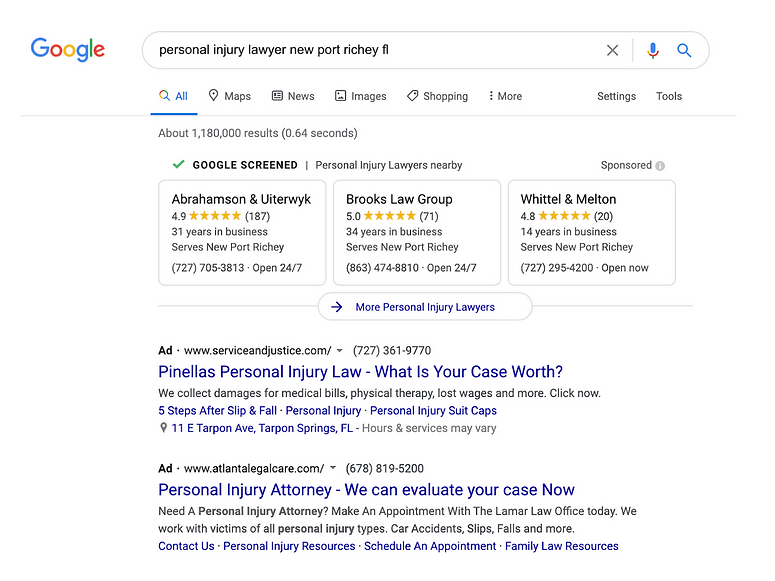
The Coveted Green Checkmark
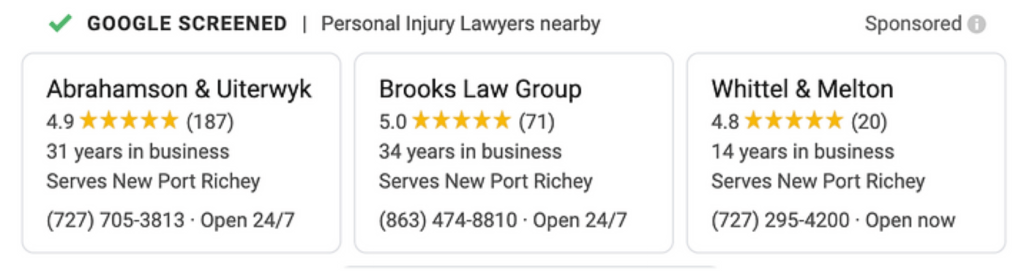
There is a pretty intense process that you have to get through in order for Google to let you have a Local Services Ad. There is a reason that you only have to pay per lead in this situation. This is a high-quality advertising approach. If Google is going to give you excellent leads, you are going to have to give it excellent information about yourself.
Creating the Account
To create a Local Services Ad account, you’ll need to provide Google at least these pieces of information:
- State Bar Membership ID number for every attorney at the firm at the specific office location you are advertising
- A copy of your firm’s certificate of general liability insurance coverage
- At least one senior partner/owner must undergo a full background check
You’ll also need to set up your online Local Services Ad profile with specifically sized photos, a business bio, service areas, business hours, and job types. You’ll need to set up your bid budget too, but we’ll get into that in a second.
Selecting the right practice areas is the most important part of creating your profile because job types are what Google uses as the key terms for searches. The job types available for you to choose from are based on what kind of licensed practice area your firm is listed as. If you have bar licenses for multiple practice areas, all job types under those practice areas will appear.
The job types weren’t written by lawyers so please don’t think too much like one when you are choosing them. Think like a potential client. What job types would a potential client type into the search bar if they were looking for the kind of services you offer? Don’t be too narrow or you may miss some leads. Don’t be too broad or you will dilute the power of your other, more accurate job types. However, if you are on the fence, we suggest erring a bit on the side of being too broad because you can always dispute bad leads (we’ll cover that in the next section).
Here’s an example of job types available for personal injury lawyers. The ones with blue sliders have been selected and will be used as search terms. The others have not been selected and will not be used as key terms:

You May Drive Yourself Crazy
I’ll be completely honest with you. Getting your profile set up involves a lot of back and forth with Google. They are only just now offering this product to attorneys for the first time so it isn’t a well-worn, smooth process for anyone. Here are problem-solving tips that we’ve learned so far (so you don’t have the urge to throw something across the room like we did):
- Use a completely new/separate Google email for your Local Services account. Even though Local Services Ads billing is directly connected to your Google Ad account, your Google Ad account email address doesn’t play nicely with setting up a Local Services profile.
- Sometimes, when you sign into your profile, it will say that you do not have an LSA account. If that’s the case, you can just open up an “incognito window” and log in there.
- Only 1024×1024 photos will appear correctly on the back end, but any photo that is 600×600 will appear correctly on the front end. In other words, don’t waste your time resizing photos to be exactly 1024×1024.
- The back end is extremely finicky about cover photo sizing, but then never displays a true cover photo on the profile.
Obviously I have some bias, but I honestly believe that you are better off hiring a firm like ours to handle this process, avoiding the time-suck and headaches that are basically inevitable with Local Service Ads at this point.
Here at Juris Digital, my team will:
- Set up your account for you and onboard you with what you need to know
- Manage document collection and retention to get and keep your Google Guaranteed status
- Optimize your Local Services Account, including streamlining it with your other online marketing efforts
- Give you honest, detailed reports so you know if Local Service Ads are working for you or not
- Check all generated leads and dispute ones that you shouldn’t be charged for (more on that later)
- Quickly and concisely answer your questions, troubleshooting anything that comes up (aka your days of trying to submit Google tickets are over)
Final Product
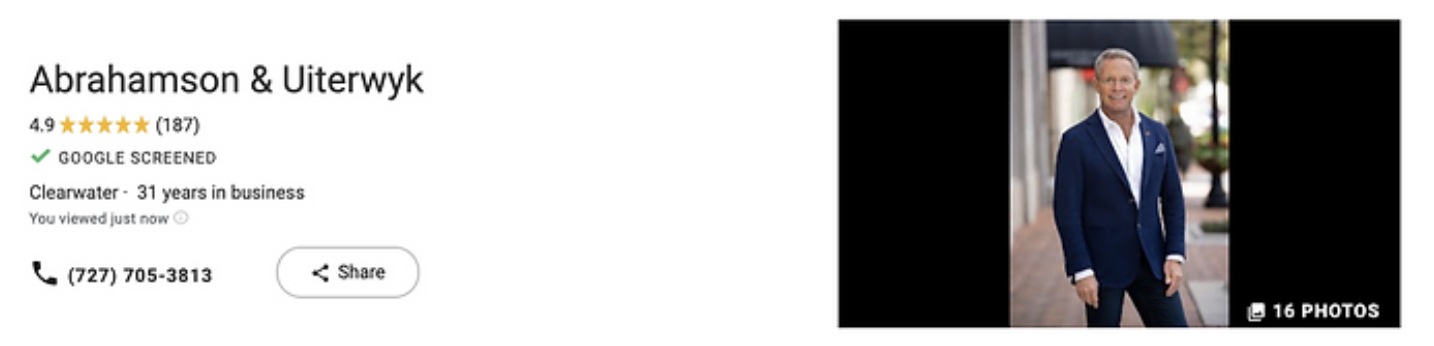
When you successfully finish the verification process and your background check is approved, Google puts a big green check mark on your ad, with the text “GOOGLE SCREENED.” And remember, your ad with that big beautiful green checkmark is listed at the very top of the results page.
Let’s talk money
The Difference between Local Services Ads and Pay Per Click
Simply put, in Local Services Ads, you pay per lead, whereas with Pay Per Click, you… pay per click. So what’s the catch? Why would you pay per click when you could instead only pay per lead? There really isn’t a catch. Local Service Ads are the new iteration of online marketing. We recommend you start the sign up process immediately for Local Service Ads. Really, really, really.
With that being said, PPC is still a super important tool in the tool box for now. It does things that Local Services Ads can’t:
- For Local Services Ads, you can only select practice areas as key terms. With PPC, you can still use whatever key term you come up with.
- You have (hopefully) been running PPC ads for a long time now. Nothing beats a long, consistent campaign in terms of staying on top of the rankings.
- PPC campaigns most likely help your Local Services Ads investment. Google’s algorithms on Local Services Ads are still a little murky, but one would be safe in assuming that a well-established PPC campaign would contribute, directly or indirectly, to Local Services Ads ranking.
- PPC bidding is pretty settled. The big buyers have established themselves. There aren’t wild fluctuations as new competitors flood in to the new product. In fact, PPC prices may even decrease as more folks move to Local Service Ads. Local Services Ads, while relatively cheap now, will inevitably see price fluctuations that come with a new product and a rapidly expanding pool of new bidders.
- PPC doesn’t require any background checks.
- If you just started your own firm, you want to get your name out there ASAP. PPC campaigns can be started quickly, as opposed to Local Services Ad’s lengthy process.
What Counts as a Lead?
Ok, so we’ve established that with Local Services Ads you only pay per lead. But what does Google count as a lead? For Google, a lead in Local Services Ads is when a potential client uses the phone number Google lists on your Local Services Ad. It records the call and lists it on the back end of your account.
One thing I do for my Local Services Ad clients every morning is check these recorded calls to make sure they are truly good leads. Google doesn’t charge you for calls where a potential client hang ups before the call is answered, although it does list those as leads. But Google will usually charge you if the call is picked up, even if the case isn’t a good fit. For example, your staff might spend ten minutes with a potential client on the phone, only to ascertain that they don’t have a case that you can help them with. Google will probably charge you for this lead. However it is possible to dispute this call on the back end of your Local Services Ad. I have found that Google generally does refund you in the case of a dispute. I like checking these calls every day for my clients so their money is refunded faster and so the call won’t count towards their leads cap (more on lead caps in a second).
The Bid Budget
The bid budget process for Local Services Ads is identical to that of Pay Per Click. If you need a refresher, check out our blog post.
There are two rules of the game to keep in mind when you are starting to think about your bid budget. One, Google always sets the floor for the bid price. You can’t try to bid $0.01 for a lead– Google doesn’t want that nonsense. So far, I have seen Google set the minimum bid price anywhere from $16 to $150 for Local Services Ad leads, depending on the geographical location and the practice area. Minimums will likely rise as more attorneys find out about Local Services Ads, so move fast if you want to take advantage of the low minimums. The second rule is that you have to provide a weekly budget. By working in units of 1 week, Google keeps the bidding process fairly stable and manageable. Remember, you only pay if you get a lead. A budget just says “I will allow Google to take up to this amount of money out of my account this week if/when leads come in.”
We typically recommend going with the “Maximize Leads” option. With this option, Google helps you automatically compete with rival bidders. You can set your ideal bid, but then Google takes your whole weekly budget amount and strategically raises your bid when needed to make sure you don’t get bumped out by higher rival bids. Here’s an example: Let’s say you want to bid $50 per lead which puts your weekly budget around $1,500 (again, Google forces you to think in terms of a week, not just a one-off lead). If your rival comes along and bids $90 per lead, Google will automatically raise your bid to around $100 per lead so your ad still shows. That means you will be capped at 15 leads for the week ($1,500 divided by $100) instead of 30 ($1,500 divided by $50)— but if Google hadn’t raised your bid price, you could have been bumped way down and not gotten any leads at all.
Some of my current clients have lost money in the past because they hired someone who said they knew how to bid on Google Ads. Let me tell you, there is a big difference between knowing how to bid on Google Ads and being good at it. If you aren’t sure if you are getting the biggest bang for your buck, I’m happy to take a look at your numbers for you and let you know what I think.
Don’t Forget: It’s About Comprehensive Strategy
As always with everything online marketing related, your Local Services Ads do best when they are complemented by good PPC and SEO content strategy. Google is learning to think more and more like a potential client. That means there are no more quick results in online advertising any more. Quality and consistency are critical.
With that being said, if you miss out on Local Services Ads you are going to be behind. I would move quickly on this one. I’m in the back end of Local Services Ads every day, so don’t hesitate to shoot me any questions you may have!
Policy Op-Ed

Penned this op-ed, published in the Denver Business Journal on March 3, 2017, in the voice of a financial advisor. The financial advisor was an ally of the Americans for Financial Reform efforts to preserve the Department of Labor “fiduciary rule.”
Americans for Financial Reform sample
Opinion: Point – Fiduciary Rule Protects Investors
We’ve all seen the commercials — your retirement advisor will come to your daughter’s wedding, will help you reach your goals, will guide you on the path to the American Dream. You just have to do the right thing and invest money for your retirement.
The reality is much darker. That fatherly retirement advisor actually has no obligation to give you advice that benefits you. In fact, he usually has incentives to sell you whatever product his brokerage firm or bank is pushing that day. The “advisor” who comes to your daughter’s wedding is actually a salesman — a really, really good salesman.
Don’t just take my word for it. While big banks and brokerage firms call these employees “advisors” on the TV commercials, in court they claim the “advisor” is only “an agent who receives a commission on the sale of a product and is not paid for rendering investment advice. She is paid for affecting the sale.”
This is financial industry double-talk that makes no sense to hardworking Americans and undermines their trust.
Recently, the U.S. Department of Labor (DOL) cracked down on this kind of deception. Late last year, the DOL created the commonsense “fiduciary duty rule:” If you are advising savers on retirement products, you have to put their interests first.
Registered Investment Advisor firms and Certified Financial Planners already hold themselves to the higher standard of the fiduciary duty rule. All savers should ask their financial advisor if they are held to a fiduciary standard at all times in all transactions. If they are not, consider a new advisor. It can save you thousands of dollars or more.
I wish the DOL rule was the end of the story and that all financial “advisors” were being held to the higher standard. Sadly, President Trump signed an executive order Feb. 3 to effectively kill the rule.
The financial industrial lobbyists are thrilled. Why? It’s all about the money: $17 billion a year, conservatively. That’s the profit the White House Council of Economic Advisers estimates big banks and brokerage firms make from providing retirement advice.
The council also found that “a typical worker who receives conflicted advice when rolling over a 401(k) balance to an IRA at age 45 will lose an estimated 17 percent from her account by age 65. In other words, if a worker has $100,000 in retirement savings at age 45, without conflicted advice it would grow to an estimated $216,000 by age 65 adjusted for inflation, but if she receives conflicted advice it would grow to $179,000—a loss of $37,000 or 17 percent.”
How does the financial industry justify their stance? They say the fiduciary duty rule would make it less profitable to give “financial advice” and therefore the investors with smaller retirement accounts would not have access to “advice” because it does not make business sense.
In other words, they are concerned the small savers will not be served. However, if “advisors” are concerned about a small — or any — saver, they wouldn’t give advice not in his or her best interest.
It is easy to ignore the cacophony that is coming out of Washington, D.C. these days, but ignoring the importance of good retirement advice puts your hard-earned dollars at risk. Killing the fiduciary duty rule only makes sense to those who are looking to make money off of your future.
Kimberly L. Curtis is president and CEO of Wealth Legacy Institute, a fee-only wealth management firm in Denver. She can be reached at xxx xxx xxxx or via email at x@xxx.com.
Fundraising Email

Tripled three metrics: volunteer recruitment, number of donors, and total amount raised through an email-based campaign. Here is an example of a fundraising email she ghost-wrote on behalf of a supporter, Chris Ballard, a senior writer at Sports Illustrated.
Sports Illustrated ghostwritten email sample
Hi ____,
As a senior writer for Sports Illustrated, I’ve been able to cover everything from NBA stars to high school teams to playing pick-up basketball in prison. One thing is clear to me: The sports community needs SportsChallenge. SportsChallenge develops essential life skills in at-risk youth.
That’s why today I stand with Paola, Thad, Tatianna and the SportsChallenge staff to ask you to give low-income student-athletes a chance to develop leadership skills on and off the courts and fields. Its executive director, Jeremy Edwards, is someone I’ve known for twenty years and I can’t speak highly enough of his own leadership skills, as well as his vision and dedication to helping young athletes through the power of sports.
It’s hard to imagine a better investment than training the next generation of change-agents. You not only will provide a kid with an extraordinary experience, but you also will empower a future community leader.
PLEASE DONATE HERE
Proud to support SportsChallenge,
Chris Ballard
Senior Writer, Sports Illustrated
Website

Worked with a small business owner to identify her target audience. Rewrote the website copy to better position her expertise and offerings. You can read the website here.
Social Media

Managed the social media platforms of an international development organization. The organization tripled their monthly new followers on LinkedIn.
LinkedIn post sample
🍇 In Tanzania, smallholder farmers were suffering 30% post-harvest loss in a key cash crop: fresh grapes.
Through the support of MEDA’s FEGGE project, these farmers turned to solar tunnel drying as an inexpensive way to convert potential post-harvest loss into a new, year-round product to sell: raisins.
This case study highlights the potential of applying #CircularEconomy principles in agriculture to:
💰 Maximize the utilization of agricultural produce
🗑️ Reduce waste through value addition
🧺 Create diversified and inclusive markets
🚚 Reduce wastage, storage, and transportation costs
To read the full case study, download MEDA’s new “Unlocking Circular Economy Opportunities in Agriculture” report here: https://lnkd.in/ebNKvqhh.
Video Script
Wrote a script weaving together a candidate’s life story, inspiration, vision, and policy priorities. This video won the “Most Inspirational Campaign Video” award by the national organization Run for Something. The candidate, Auon-tai Anderson, won his citywide campaign.
Award winning video script
Meet Tay Anderson
YOUNG TAY: My mom was in high school when she had me. My grandmother raised me at first, but then she got sick and I had to take care of her. I had to help her eat, help her take a bath, help her with everything. My world kind of caved in. Everything was stressful. I was depressed, I got bullied. I was angry, I lashed out. I spent some time in the foster care system and the juvenile justice system.
YOUNG TAY: My grades were horrible. It wasn’t because I had trouble understanding the content. School just didn’t matter compared to everything else that was overwhelming me.
TAY: Two things changed my trajectory: First, I can’t tell you what it means for a lost black kid to see a black man become president. I had seen myself as a problem. Obama showed me that maybe I wasn’t a problem, but a potential solution.
TAY: Second, I found community. My high school ROTC gave me a reason to show up to school every day. Friends I started making through community activism became family.
TAY: When I looked at my mom’s life and my life, it became obvious that what we talk about when we talk about schools completely misses the point. The foundation isn’t reading, writing, and arithmetic. The foundation is community, support, and inspiration. That’s what drives learning. If we focus on student engagement, absenteeism will naturally decrease. If we invest in improving student mental health, grades and test scores will follow. If we make sure every community has a good school and every school has a supportive community, then we don’t have to worry about a complicated choice system where some kids are stuck at schools that nobody wants to choose.
TAY: That’s why I decided to run for Denver school board. Folks have been too busy focusing on outcomes instead of causes. You can’t fix problems that way. I know sometimes it feels like everything is hopeless and the problems in our education system are just too big and complicated. But trust me, if we invest in what really matters to students, they will change their own outcomes. I know I did.
TV ad script
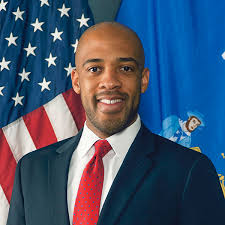
Wrote the script for a campaign’s 30 second TV ad. Mandela Barnes won the statewide race for Lieutenant Governor in November of 2018.
Lieutenant Governor Mandela Barnes ad script
Supporter 1: Honestly, Mandela gives me hope for Wisconsin.
Supporter 2: As a kid, he lived in a tough neighborhood—
Supporter 3: the most incarcerated zip code in the entire country.
Supporter 4: And yet there he was, elected to the State Assembly at the age of 25.
Supporter 5: Wisconsinites see the best parts of themselves in Mandela.
Supporter 6: They see their struggles— but they also see their determination.
Mandela: I grew up hearing about the greatness of Wisconsin, but also how it can break your heart. I was raised to never take my eyes off the goal. I know we can make Wisconsin the place we all want it to be.
 Katie Dunn